
 Surefire report output
Description
The Surefire report output transform turns rows with test results into a Maven Surefire XML report, the JUnit format that CI servers such as Jenkins and GitLab read. Each row becomes one test case.
The report is written when the last row has arrived. The rows pass through unchanged, so the transform can sit in the middle of a pipeline.
Options
| Option | Description |
|---|---|
Transform name |
Name of the transform. |
Report filename |
The XML file to write. Variables are allowed. |
Test suite name |
The name of the test suite in the report. Default: |
Create parent folder |
Create the folder of the report file when it doesn’t exist. |
Test name field |
The field with the name of the test. Required. The value is shortened: everything up to the last |
Duration field |
The field with the duration of the test, in seconds. |
Duration is in milliseconds |
The duration field is in milliseconds, for example the |
Result field |
The field with the result of the test. Without it, every test passes.
Any other value, or an empty one, fails. |
System-out field |
The field with the log of the test, for example the |
System-err field |
The field with the error output of the test. |
Failure message field |
The message of a failed, errored or skipped test. |
Failure type field |
The type of a failed or errored test. Default: the test name. |
Fail pipeline on test failure |
After writing the report, stop the pipeline with an error when a test failed or had an error. |
Example: a report for a folder of test workflows
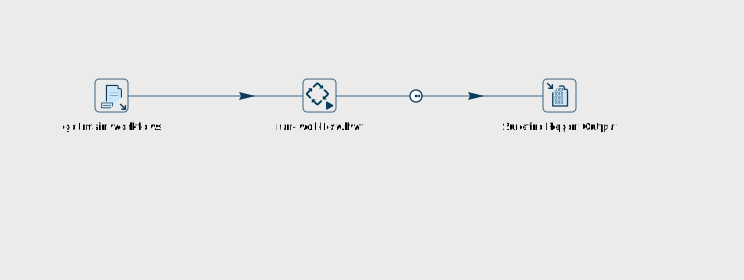
Hop’s own integration tests use this transform to report their results to Jenkins, in run-project-tests.hpl:
-
Get file names lists the workflows of the project whose name starts with
main, including its subfolders. -
Workflow executor runs each of these workflows, through a small workflow that gets the file name as a parameter, and sends the execution results to the Surefire report output transform.
-
Surefire report output uses
filenameas the test name field,ExecutionTimeas the duration field (in milliseconds),ExecutionResultas the result field, andExecutionLogTextas the system-out field. Fail pipeline on test failure is on, so a failed test also ends the pipeline with an error.
For main-load-customers.hwf, which succeeds, and main-load-orders.hwf, which ends with an Abort action, the report looks like this (the logs are shortened):
<testsuite ... version="3.0" name="my-project" time="0.131" tests="2" errors="0" skipped="0" failures="1">
<testcase name="load-customers" time="0.071">
<system-out>
<![CDATA[2026/11/06 11:49:07 - run-workflow - Start of workflow execution
...
]]>
</system-out>
</testcase>
<testcase name="load-orders" time="0.060">
<failure type="load-orders"></failure>
<system-out>
<![CDATA[2026/11/06 11:49:07 - run-workflow - Start of workflow execution
...
2026/11/06 11:49:07 - Abort - ERROR: stop
...
]]>
</system-out>
</testcase>
</testsuite>
Notes
-
Run the transform in one copy. Each copy writes its own report to the same file, so with more copies the report misses tests, or the transform fails.
-
The report filename is a local file path. VFS locations such as
s3://orfile://URLs are not supported. -
ANSI color codes and characters that XML can’t hold are removed from the texts in the report.
Samples
The samples project has transforms/surefire-report-output.hpl, which writes a report for two tests from a Data grid.