
Metadata Injection
What is metadata injection?
Metadata is at the very core of everything in Apache Hop. When you develop a pipeline, the transforms with all of the configuration options, the hops between those transforms and the pipeline run configuration you use to run the pipeline are all metadata items.
There are use cases where you’ll find yourself creating different variations of what is basically the same pipeline.
Consider this simple pipeline as an example: you need to load transaction data values from a supplier, filter out some specific values, and output everything to a file.
The process is always the same, the only difference is the different file layouts, maybe different values to filter out, and the output file.
Metadata injection can make this process a lot easier by taking the metadata for this pipeline from various sources and inject it into a template pipeline at runtime.
After injection, Apache Hop has an in-memory pipeline that is configured for the exact metadata you need for this run.
Instead of one pipeline per supplier, you’ll only need one template pipeline and one injecting pipeline. This significantly reduces the number of files to maintain, the number of repetitive tasks and thus increases stability maintainability of your project.
How metadata injection works
the sample below is available from the metadata-injection folder in the samples project.
|
The template pipeline is an empty pipeline that contains all the necessary transforms and hops for the flow of the pipeline, but none of the configuration.

The injecting pipeline is a standard pipeline that gathers and prepares all of the required metadata to run the template pipeline through the ETL Metadata Injection transform.
The Metadata Injection transform reads the template pipeline and lets you map fields from the injecting pipeline to target fields in the transforms in the template pipelines.
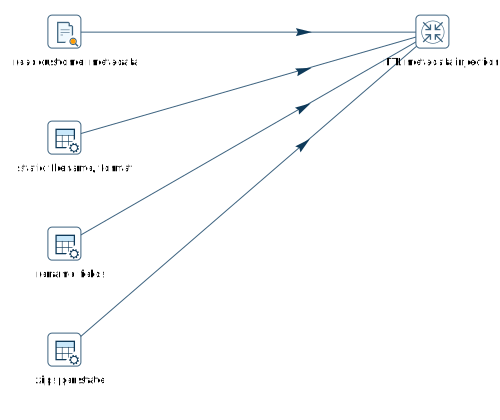
Here’s what happens in the example below:
-
read customer metadata parses a sample file and reads its file layout. The various items of the detected file layout are injected in the fields for
read customer datain the template pipeline. -
static filename, format provides the file name and file format from a data grid.
-
rename fields provides the original names and new names for fields that will be injected into the
cast datesSelect Values transform in the template pipeline. -
zips per state provides all of the required information to configure
nb zip codes per statethe Memory Group By transform in the template pipeline
In addition to the injection explained above, the sort state Sort Rows transform etc are configured by information (metadata) that was already provided to the metadata injection transform. Additionally, the metadata injection can be configured to provide static (hard-coded) values to the template pipeline.
| The ETL Metadata Injection transform overrules the default behavior for pipelines: not all incoming streams need to have the same layout. It is perfectly ok to provide input to the metadata injection transform from different streams with different layouts. |
Metadata Injection Debugging and Troubleshooting
The ETL Metadata Injection transform generates and executes a generated pipeline with the injected metadata by default.
This may be one too many levels of abstraction when you’re debugging or troubleshooting pipelines that use metadata injection.
This default behavior can be overruled from the Options tab:
-
Optional target file (hpl after injection)
-
Run resulting pipeline
Disabling the run resulting pipeline and providing a filename for the injected pipelines to be written to lets you open and troubleshoot the generated pipelines as you would with any other pipeline. This can make troubelshooting metadata injection significantly more productive.
Metadata Injection recommendations
We recommend the following basic procedure for using this transform to inject metadata:
-
Optimize your data for injection, such as preparing folder structures and inputs.
-
Develop pipelines for the repetitive process (the template pipeline), for metadata injection through the ETL Metadata Injection transform, and for handling multiple inputs.
The metadata is injected into the template pipeline through any transform that supports metadata injection.