
 Table Input
Description
|
Pipeline source: this transform can start without incoming hops. If hops are present, incoming rows are still read. |
The Table Input transform is one of the most frequently used transforms in Apache Hop. It reads data from a relational database using a connection and an SQL query, and introduces that data into a pipeline.
This transform supports parameterization using:
-
Apache Hop variables (e.g.,
${customerId}) -
Named input fields from a previous transform (JDBC prepared statements using
{fieldName}placeholders) -
Positional input fields from a previous transform (JDBC prepared statements using
?placeholders)
The dialog is split into SQL, Options, and Fields tabs.
These features make Table Input ideal for dynamic and reusable data retrieval logic.
Calling a stored procedure
A procedure that returns rows can be read with ordinary SQL in this transform.
MySQL and MariaDB accept CALL:
CALL list_customers();PostgreSQL functions are usually selected like a table:
SELECT * FROM list_customers();Many other JDBC drivers accept the call escape:
{call list_customers()}Call DB procedure runs the procedure once per incoming row and can also return a scalar value and OUT or INOUT parameters. Use it when those arguments come from the stream. Use Table Input when the call is SQL and you only need the result set.
Getting Started: Generate a Basic SQL Query
You can auto-generate a query using the Get SQL select statement button.
This opens the database explorer, allowing you to select a table or view. Once selected, you can choose to generate:
-
A full column list:
SELECT col_a, col_b, col_c FROM my_table; -
A wildcard query:
SELECT * FROM my_table;
Use Fields from a Previous Transform
Incoming hops are parameter sources. Table Input reads all of them, not only the transform named in Insert data from transform. Parameter rows are never copied to the output; only the SQL result is.
Insert data from transform is optional. When you select a transform there, that hop is informational (the usual Hop info hop used for lookup-style data). You can leave it empty and still bind parameters from any incoming hop. Enabling Use named parameters turns on Execute for each row when hops exist and, when there is a single incoming hop, fills Insert data from transform for you.
Prefer named parameters {fieldName} so the SQL does not depend on incoming field order. Enable Use named parameters on the SQL tab (on by default for new transforms, off when opening existing Table Input metadata). Use Insert field… to pick an incoming field and insert {fieldName} at the cursor.
Execute for each row is the usual case: run the query once per incoming row. Disable it only for the legacy assemble-all path, where every incoming row is concatenated into one parameter list. That is how positional SQL such as WHERE bar IN (?,?,?) can be filled from three one-field rows.
When the SQL has no bind placeholder at all (no {fieldName} and no positional ?), Table Input never binds incoming rows to the statement.
With Execute for each row off, the incoming hops are still consumed so an upstream transform can complete before the query runs (header or sequencing hops), but their rows are only drained, never concatenated into a parameter list and never bound, and the query runs once without parameters.
With Execute for each row on, the query runs once per incoming row (the usual contract), still with no parameter bound.
Binding values to a statement without placeholders fails on every driver (for example ORA-17003 Invalid column index on Oracle), so this is what keeps those pipelines working.
| This restores the 2.19 behavior for SQL without placeholders and keeps the 2.20 "optional lookup" feature for SQL with placeholders: named and positional parameters are still read from every incoming hop (even with an empty Insert data from transform). |
If two hops into Table Input have different layouts, Hop still warns about mixing rows. That check is unchanged.
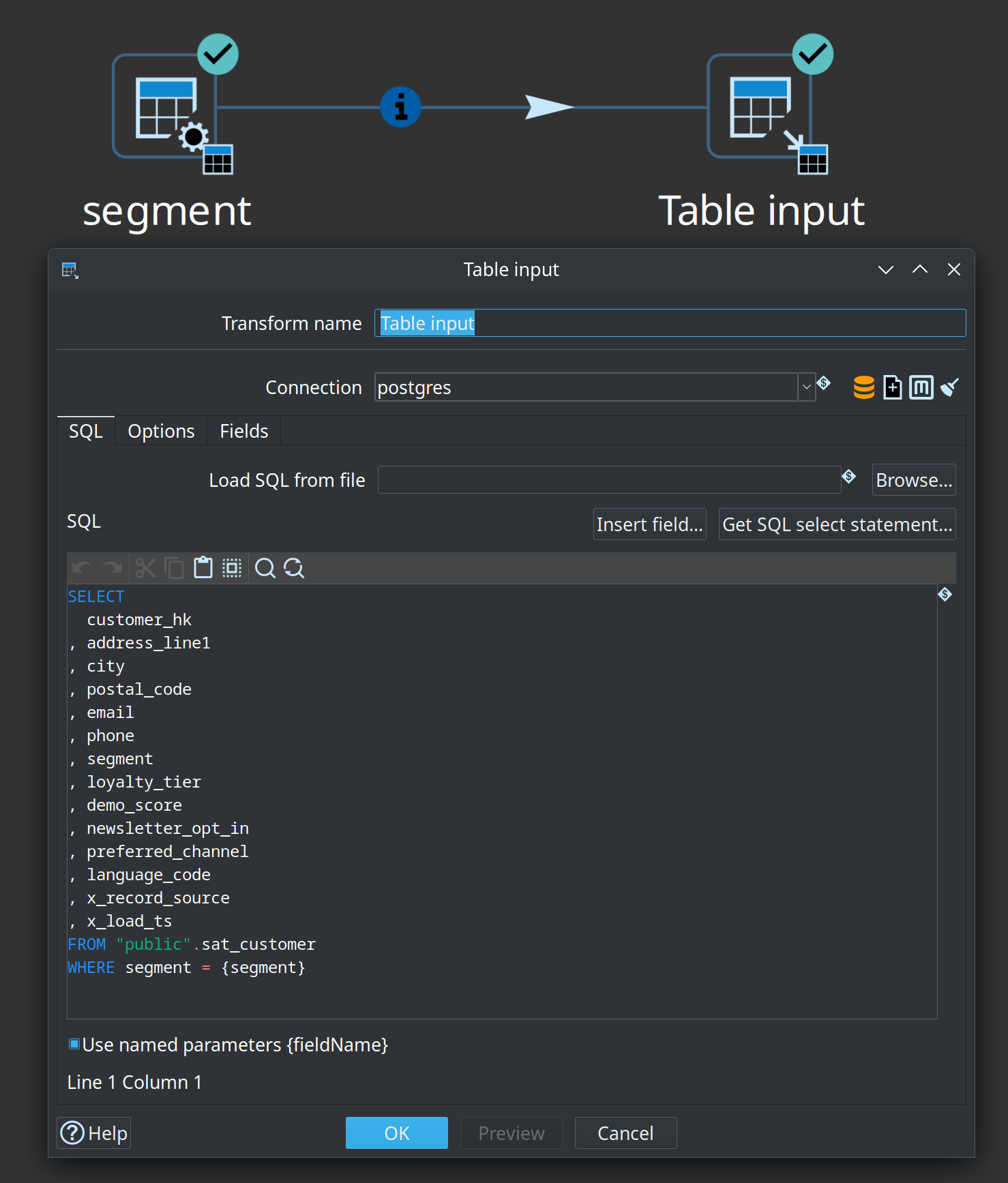
SELECT *
FROM public.tableinput
WHERE id > {openfield}id{closefield}
  AND changed_date >= {openfield}fromDate{closefield};
Named parameters:
-
Are opt-in so existing SQL that already uses curly braces is left unchanged
-
Bind by incoming field name (case-insensitive)
-
Can be used more than once
-
Ignore extra incoming fields
-
Cannot be mixed with positional
?in the same statement -
Do not conflict with Hop variables
${variable} -
Work best with a single parameter row, or with Execute for each row
Classic positional ? placeholders remain supported. Values are passed in the order of fields in the incoming stream. Use a Select Values transform to ensure the correct field order if you use ?.
Prepared statements:
-
Improve security by preventing SQL injection
-
Cannot parameterize all parts of a SQL statement (e.g.,
IN (?)or table names)
You can also combine named or positional parameters with variable substitution.
Sample pipeline: tableinput-named-parameters.hpl
Examples
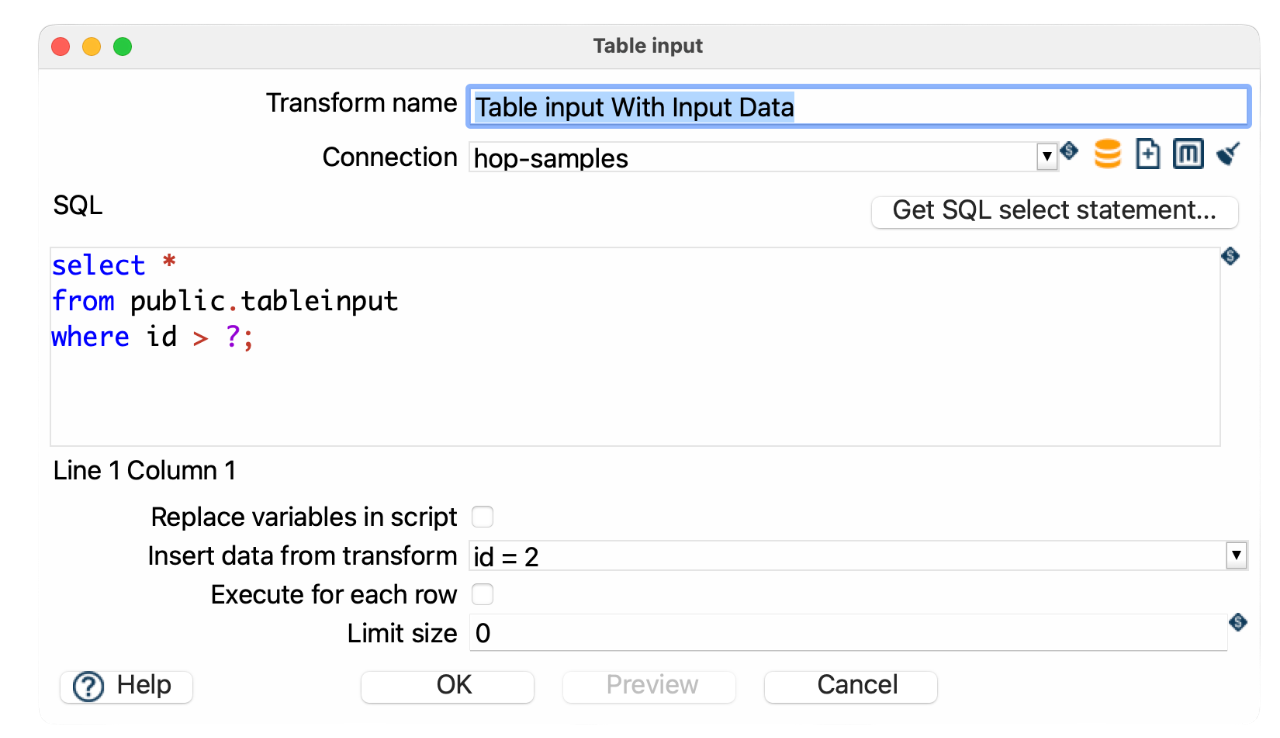
SELECT *
FROM public.tableinput
WHERE id > ?;-
Replace variables in script: unchecked
-
Insert data from transform: optional; select the previous transform to mark the hop as informational, or leave empty if a hop is already connected
Sample pipeline: tableinput-accept-input.hpl
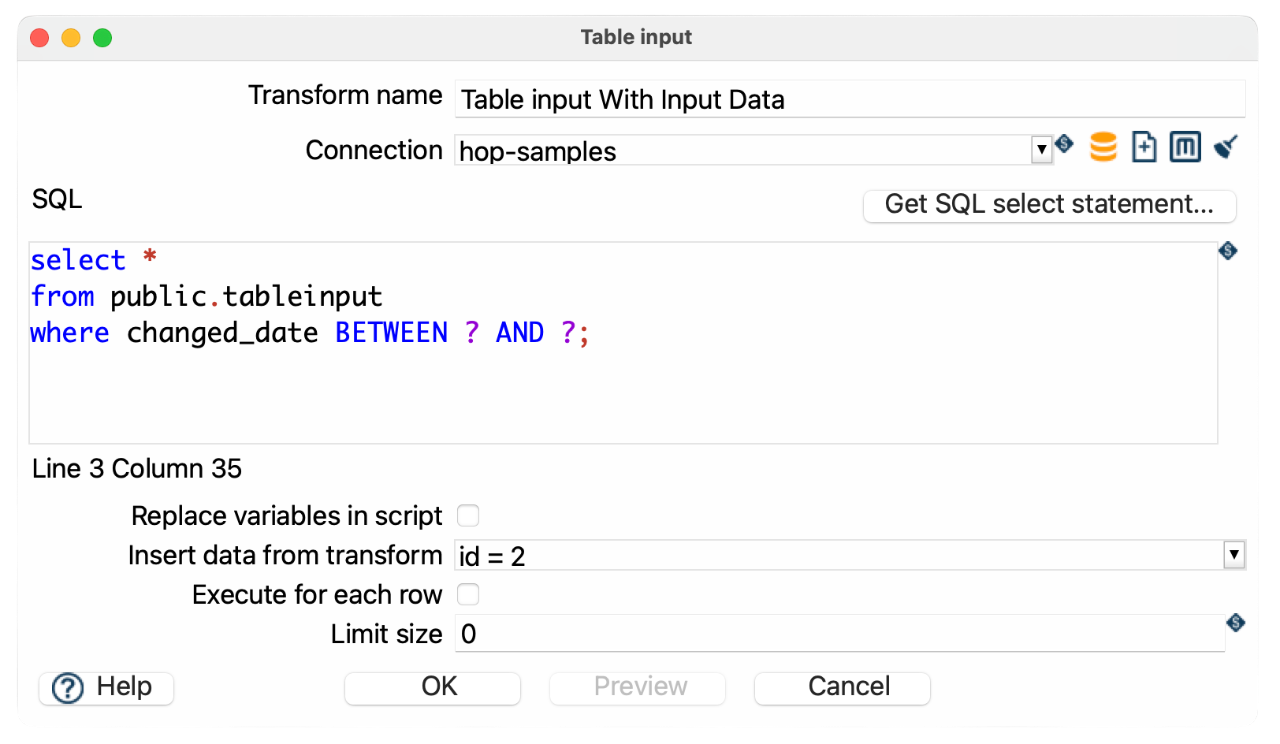
SELECT *
FROM public.tableinput
WHERE changed_date BETWEEN ? AND ?;-
Use a
Get System Infotransform to generate the start and end dates -
Insert those dates using
Insert data from transform
Use Variables in Your SQL Query

If your query includes Hop variables, enable Replace variables in script. This performs a simple string replacement before the query is sent to the database.
SELECT *
FROM public.tableinput
WHERE id > ${PRM_ID};-
${PRM_ID}is defined as a pipeline variable (e.g., via parameters orSet Variablestransform)

-
This gives you full control over the query structure
-
Combine with
?placeholders if needed
| Variable substitution happens before execution and does not protect against SQL injection. |
-
Replace variables in script: checked
-
Insert data from transform: leave empty
Sample pipeline: tableinput-variables.hpl
Using Both Variables and Prepared Statements
You can combine both techniques in a single query:
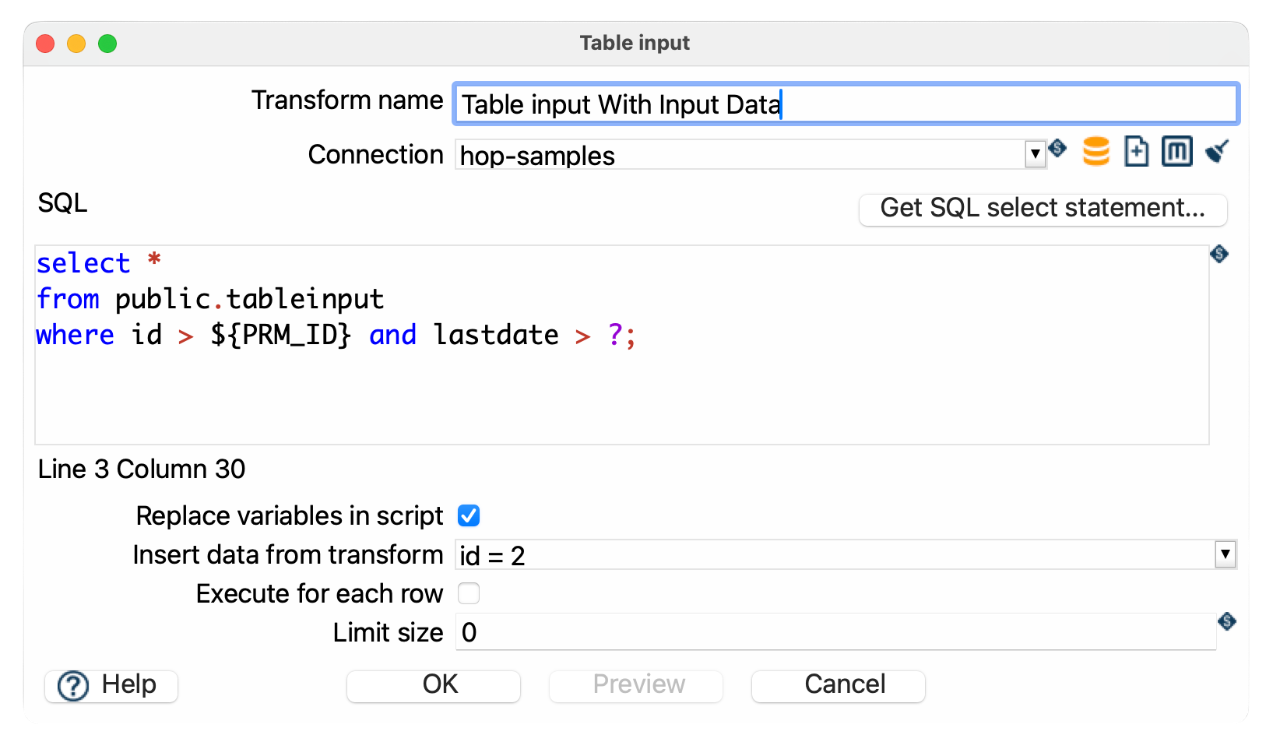
SELECT *
FROM public.tableinput
where id > ${PRM_ID} AND lastdate > ?;-
${startDate}is a pipeline variable -
?is a parameter provided by the input stream
Parallel reading
Keep NR_COPIES as a parameter of the pipeline. On the pipeline properties Parameters tab, give it a default and a description so the copy count is documented with the pipeline and easy to change for a run. Changing that one value lets you test the limit of the source database’s capacity. See Parameters.
A large read often keeps one database session busy on a single CPU core, while the network and the disks still have capacity. Several copies of the same Table Input share that read. Unless the copies share a connection, each copy runs the query on its own session, and a predicate assigns that copy its own slice of the rows.
Every row has to land in exactly one copy. Each copy reads its own snapshot; for a consistent result, read from a table that isn’t being changed during the run. Build the predicate so that it maps a key onto the copy number.
Setup
-
Set pipeline parameter
NR_COPIESto the number of copies for this run, for example4. -
Click the Table Input icon and set Specify copies to
${NR_COPIES}. See Specify copies. The copies field accepts a positive integer or a single variable. -
Enable Replace variables in script. Hop substitutes the variables before the database receives the SQL.
-
Add the slice predicate to the
WHEREclause.
${Internal.Transform.CopyNr} is the copy that is running this query. Copy numbers start at 0. The last copy is NR_COPIES - 1. See internal variables.
Each copy is a thread with its own database connection on the engines that honor the copy count, unless the copies share a connection. Don’t use a transactional run configuration; it makes all copies share one connection. See which engines run copies in parallel.
The statements stay the same apart from the copy number. Limit size and a SQL LIMIT apply inside each copy, so four copies with LIMIT 100 return up to 400 rows.
The next transform receives the rows from every copy. One copy of that transform merges the slices into a single stream.
Leave Table Input unpartitioned. A partition schema sets the number of copies itself.
Integer keys
Oracle, MySQL, MariaDB, and PostgreSQL accept the same predicate for a non-negative integer key:
SELECT *
FROM orders
WHERE MOD(table_id, ${NR_COPIES}) = ${Internal.Transform.CopyNr}
MOD returns 0 through NR_COPIES - 1 for a non-negative table_id, which is the range of copy numbers. Combine it with AND when the statement already has a WHERE clause.
MOD of a negative number keeps the sign of that number on these databases. A negative remainder matches none of the copy numbers, so that row is left unread. A NULL key is left unread as well, because the comparison is unknown.
MOD(table_id, …) usually cannot use a plain index on table_id. Each copy scans its slice. The extra sessions speed the read up when one session is capped by a single server core and the storage and network can serve those sessions.
Other keys
When the key is not a single non-negative integer, hash the columns and take that value modulo ${NR_COPIES}. A CRC, a hash, or one byte of an MD5 digest all work. The expression has to stay non-negative, and it has to be the same in every copy.
The slices are even when the number of copies is a power of two (2, 4, 8, 16). Any other count still returns every row, with a few copies receiving slightly more rows than the others.
Oracle
ORA_HASH returns a bucket for an expression. The second argument is the highest bucket number, and the function returns 0 through that number inclusive. Four copies use buckets 0, 1, 2, and 3, so the second argument is ${NR_COPIES} - 1. Hop replaces the variable first and the database evaluates the subtraction. The third argument is a constant seed. Use the same seed in every copy so the split stays stable. Oracle’s example of 100 buckets passes 99.
SELECT *
FROM sales
WHERE ORA_HASH(CONCAT(cust_id, prod_id), ${NR_COPIES} - 1, 12345)
    = ${Internal.Transform.CopyNr}
Oracle computes the bucket as the raw hash modulo the number of copies. That split is uniform when the number of copies is a power of two.
CONCAT returns NULL only when both values are NULL, and that row is left unread.
MySQL and MariaDB
CRC32 returns an unsigned 32-bit checksum:
SELECT *
FROM sales
WHERE MOD(CRC32(CONCAT(cust_id, prod_id)), ${NR_COPIES})
    = ${Internal.Transform.CopyNr}
The first byte of an MD5 digest is a number from 0 through 255:
SELECT *
FROM sales
WHERE MOD(
        CONV(SUBSTR(MD5(CONCAT(cust_id, prod_id)), 1, 2), 16, 10),
        ${NR_COPIES}
      ) = ${Internal.Transform.CopyNr}
CONCAT returns NULL when any argument is NULL, and that row is left unread.
PostgreSQL
The first byte of an MD5 digest is a number from 0 through 255:
SELECT *
FROM sales
WHERE MOD(
        get_byte(decode(md5(cust_id::text || prod_id::text), 'hex'), 0),
        ${NR_COPIES}
      ) = ${Internal.Transform.CopyNr}
hashtext hashes the whole value. It can return a negative integer. Cast to bigint before ABS, because ABS of the smallest 32-bit integer overflows.
SELECT *
FROM sales
WHERE MOD(
        ABS(hashtext(cust_id::text || prod_id::text)::bigint),
        ${NR_COPIES}
      ) = ${Internal.Transform.CopyNr}
The || operator yields NULL when either side is NULL, and that row is left unread. hashtext is the function PostgreSQL uses for hash indexes, so every copy in one run shares it.
Pro Tips
| The Table input transform does not pass input data to the output, only fields inside the query are returned to the pipeline so all other variables and data will be lost. You can solve this by adding the variable as a field in the query or put a Get variables transform behind the table input. |
| If you are getting unexpected query results, try clearing the database cache. Click the broom icon or go to Tools > Clear DB Cache. After clearing, click OK, save your pipeline, and reopen it if needed. |
| A cartesian join transform will combine a different number of fields from multiple table inputs without requiring key join fields. |
| When Execute for each row is off, Table Input waits until every incoming hop has completed so it can concatenate the parameter rows. When the SQL has no bind placeholder, the incoming rows are only drained so an upstream header or sequencing transform can complete before the query runs. |
For better performance with large datasets you can use indexed columns in WHERE clauses and avoid SELECT * and only retrieve needed fields. To spread one table read across several database sessions, see Parallel reading.
|
Dynamic SQL with Metadata Injection
Table Input can be used in a metadata-driven pipeline. For example, create a template pipeline with a generic query:
SELECT *
FROM ${tableName}
WHERE ${condition}
Then use a Metadata Injection transform to inject actual values (e.g., from a CSV or database).
-
Create a template pipeline with Table Input
-
Use
${tableName}and${condition}as placeholders -
In a separate pipeline, use Metadata Injection to inject values into the SQL field
-
Execute the injected pipeline
This allows you to create reusable and dynamic pipelines without editing SQL manually.
You can inject metadata into the following fields of the Table Input transform:
-
Connection
-
SQL
-
Replace variables in script?
-
Insert data from transform
-
Execute for each row?
-
Limit size
-
Use named parameters
-
Specify output fields
-
Validate specified fields
-
Output field name, type, format, length, and precision
Preview
The Preview button opens a dialog where you set how many rows to fetch and a query timeout in seconds (JDBC Statement#setQueryTimeout).
-
The timeout applies only while the pipeline is running in preview mode from the Hop GUI (not during a normal pipeline run from a run configuration or Hop Run).
-
You can set a default for the timeout field with the
HOP_QUERY_PREVIEW_TIMEOUTapplication variable (0= no default from the variable). When the variable is0or unset, the dialog still suggests5seconds for the initial value.
Specify output fields
On the Fields tab you can define the output schema instead of asking the database for column metadata. This is the offline design case: developers without database access can still build the pipeline, while Hop Server (or another runtime) executes the query later.
-
Specify output fields: use the field list as the transform output (name, type, length, precision, format).
Get fieldscan still fill the list from the query when a connection is available. -
Validate specified fields: after the query runs, compare the result columns with the specified list. The transform fails if a specified field is missing or the Hop types do not match. Extra columns returned by the query are ignored. When validation is off, missing specified fields still fail (they cannot be mapped) and type differences are converted.
Options
| Option | Description |
|---|---|
Transform name |
Name of the transform instance. |
Connection |
Database connection to execute the query against. |
SQL tab |
SQL statement, optional SQL file, |
Use named parameters |
When enabled, |
Replace variables in script? |
Enable to substitute variables (e.g., |
Insert data from transform |
Optional. Names the hop that should be treated as informational (parameter rows, not the SQL result). Parameter values are read from all incoming hops. Leave empty when you only need the connected hops as parameter sources. When the SQL has no bind placeholder, the incoming rows are never bound (only drained when Execute for each row is off). |
Execute for each row? |
When incoming hops exist, run the SQL query once for each incoming row. Disable to concatenate all incoming rows into a single parameter list (legacy |
Limit size |
Maximum number of rows to return from the query. |
Specify output fields |
Define the output field list instead of reading column metadata from the database. |
Validate specified fields |
When specifying fields, fail if the query result names or types do not match the list. |
Limit size vs. SQL LIMIT
There are two different ways to restrict how many rows Table Input returns. They are not equivalent.
Limit size (client-side, JDBC)
The Limit size option is applied through the JDBC API (Statement#setMaxRows / PreparedStatement#setMaxRows) after the statement is created. Hop does not rewrite your SQL to add a database-specific LIMIT, TOP, or ROWNUM clause for this option.
That means:
-
Enforcement depends on the JDBC driver and database.
-
When the driver honors
setMaxRows, excess rows are typically dropped on the client side (the database may still produce a larger result set before the driver stops returning rows). -
Some drivers and engines do not implement
setMaxRowsreliably, or ignore it. This is common with certain Generic connections and query engines (for example Dremio). In those cases, Limit size may have no effect even when set to a positive value. -
A few database types in Hop explicitly report that they do not support
setMaxRows(for example Redshift). For those, Limit size is not applied via JDBC.
When you run the same pipeline under a Pipeline Executor (or any setup that uses different connections or SQL per iteration), a limit that works on one connection may be ignored on another if the second connection’s driver does not honor setMaxRows.
SQL LIMIT (server-side)
For a limit that the database applies while executing the query, put the dialect’s limit syntax in the SQL itself, for example:
SELECT col_a, col_b
FROM my_table
WHERE status = 'ACTIVE'
LIMIT 100;
Other dialects use different syntax (TOP, FETCH FIRST, ROWNUM, and so on). Use what your database supports.
Server-side limiting is usually preferable when you need a reliable cap, better performance on large tables, or when you use a Generic connection / engine that may ignore JDBC setMaxRows.
Recommendation
| Goal | Prefer |
|---|---|
Quick, approximate row cap with a well-behaved JDBC driver |
Limit size in the transform |
Reliable, portable, or performance-sensitive limit |
|
Generic connection, Dremio, or any driver that ignores |
Always use a SQL limit clause |
You can combine both: keep a SQL LIMIT for server-side control, and optionally set Limit size as an additional client-side safety net where the driver supports it.
|